


ACY Employee Services








SECURITY INDENTIFICATION BADGES
The Airport Badging Office is responsible for administering training and issuing Security ID Badges for secured areas within the airport and inside the Airport Operations Area (AOA). The Airport Badging Office also controls/assigns access to secured areas and issues permits to ramp authorized vehicles. Our customers are comprised of airline/FBO employees, tenants, contractors, vendors, consultants, government employees, general aviation pilots and military personnel.
Airport Badging Office Hours
· Badging and fingerprinting appointment hours are typically weekdays between 8:45 am - 4:00 pm. Please check online through the Airport Badge Scheduler for open appointment times.
If unable to renew your ID within normal renewal hours, contact Airport Operations to make arrangements.
Making Appointments
Appointments are required for all badging/fingerprint requests. Please make an appointment in advance online through the Airport Badge Scheduler located in the Employee Services section.
New Badge Process Summary
· New badge applicants will complete the Security Badge Application with their company’s airport Authorized Signatory.
· An appointment for fingerprinting will then be scheduled utilizing the online Airport Badge Scheduler.
· Applicant will go to airport administration at time of appointment to settle payment. Applicant must bring their completed Security Badge Application with acceptable I-9 forms of ID to the appointment.
· After receiving background check approval, the applicant must complete all applicable training, then schedule a New Badge appointment.
· Applicant will then return to airport administration per their appointment to have their new badge issued.
Badge Renewal Process Summary
· Security ID Badges must be renewed within the 30 days prior to your expiration date.
· All applicable training must be completed for badge to be renewed.
· All Security ID Badge holders must go to airport administration to settle payment.
· Security ID Badge holders that are expired for less than 30 days will be charged an additional expired badge fee.
· Badges that are expired for more than 30 days are revoked and the badge holder will have to go through the entire application process again.
· You must bring approved I-9 forms of ID at the time of renewal.
· After payment is made and all applicable training is completed, your badge will be renewed.
Lost/Stolen Badges
If your Security ID Badge is lost or stolen, you must immediately report it to Airport Operations at (609) 645-7895 ext. 4702. The Airport Operations Center is staffed 24 hours a day. Also notify your Authorized Signatory immediately.
Fees
All fees must be paid via certified check, money order or credit card.
New Badging Process
$65.00 for applicants requiring a background check
$33.00 for applicants exempt from background check (airport will notify of exemption)
Badge Renewals
$65.00 for badge holders requiring background check
$33.00 for badge holders exempt from background check (airport will notify of exemption)
$33.00 for airfield (movement area) drivers annual renewal
Lost Badge Fee - Lost badge fees are non-refundable
1st Offense $100.00
2nd Offense $150.00
3rd Offense $200.00 and/or individual may be considered for possible permanent revocation of all Security ID Badge privileges.
Not Returned Badge Fee
$100.00 per badge to be charged to the Tenant, Contractor or Company
Expired Badge Fee
$25.00 to be paid by the badge holder at time of badge renewal. Fee must be paid to airport administration before the Security ID Badge can be renewed.
Badge Deactivation
Authorized Signatories must request a badge to be deactivated by contacting Airport Operations 24/7 at (609) 645-7895 ext. 4702.
TRAINING
Working in an airport environment requires you to obtain a Security ID Badge that will provide you access to various areas depending on your job requirement. Defined areas within the airport have specific badge privileges, which require training to be completed before your access can be assigned to these areas.
Testing Procedures
- All training courses are completed through AAAE’s Online Interactive Employee Training Portal.
Please see below example of training portal –
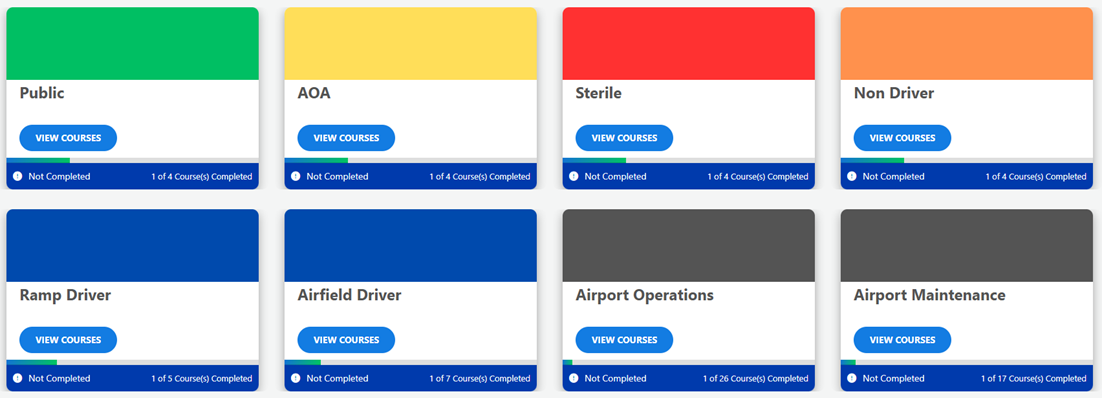
- After logging into the training portal, you must select the button that corresponds with the badge type you are approved for at the airport. Then you must complete all modules within that button.
- For each training course you will be shown short video segments and then answer a few questions on the information that was presented to you.
- You may not get more than 2 questions wrong in a section or 3 questions wrong in each module. This will result in a failure of the module.
- All required training modules must be completed prior to the date of your scheduled badge renewal or issuance.
- Applicants testing for a new badge must successfully pass all required modules for the badge to be issued. If you do not pass a module, you will need to restart the course from the beginning.
(Website not compatible with Internet Explorer)
Click Here for Online Training
NEW COMPANY SET-UP
This information is for all new companies, contractors and vendors wishing to obtain a Security ID Badge for their employees at the Atlantic City International Airport.
New Company Introduction
This information will introduce your company to the Security ID Badge procedures at the Atlantic City International Airport. Once your company has been awarded a contract to begin work at the Airport, a company representative must complete a Signatory Letter (download sample template). This letter must be completed on your company letterhead and include contact information and an email address. This letter will introduce your company to the airport, reference the project/business associated with your company and will include the signature of the company representative that can authorize requests for Security ID Badges and employment certification. This letter must be emailed to the Operations Supervisor (email located on template) and be approved prior to starting the Signatory process.
This chosen representative will become the Authorized Signatory for your company. An Authorized Signatory is the person who coordinates the Security ID Badge process for your company, signs page 3 of the badge application certifying employment, and will be the person responsible for Security ID Badges issued to your company (badge deactivations, returns, audits, etc).
Authorized Signatory
To become an Authorized Signatory, you must complete a Security ID Badge application (located under Badge Forms) and sign for yourself as the Authorized Signatory on page 3. Please utilize the PDF fillable version as we do not accept handwritten applications. Upon completion of the application, call the Operations Supervisor at (609) 645-7895 ext. 4759 to make a fingerprint appointment. At the time of the fingerprint, the applicant must bring the completed application, a credit card, certified check or money order (cash is not accepted) made payable to South Jersey Transportation Authority and two forms of identification listed on page 6 of the badge application.
After fingerprinting, a Criminal History Record Check and Security Threat Assessment are completed. The badge application approval process could take up to two (2) weeks. Once approved, you will be directed to take the online training modules (located under Training) required to be an Authorized Signatory.